How To Write Events On Arm- Swim Meet Prep
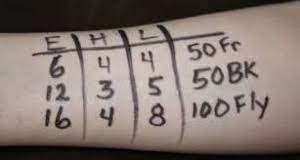
Here is an example of how to write your Swimmer's info on their arm for Swim Meets.
- This info is on the heat sheet that is sent/posted for each meet as well as in the Swimtopia App.
- Search your swimmer's name. Then write a grid, example shown above. Insert the Event #, Heat # and Lane #. You may additionally write the stroke and distance in the last column.
- Use a sharpie marker. Other markers or pens will wash off in the water and we need it to last the entire meet. Note: Sunscreen on the area will make it smudge/transfer.
- This helps the Coaches, Clerk of Course, and Timers to know where you swimmer should be for each event.
- PLEASE mark your swimmer before the meet and warm-ups.
- It is hard to write on wet arms, as well as scrambling through the heat sheets to find their info right before the meet. Doing this before will prepare your swimmer for their events, as they will know what they are swimming and when.
Text Area
Simple formatted text


